6 Grok Bots to Set Up for Your Construction Business
Video: How to Set Up Grok Bot for Your Construction Business
· based on the channel Tim Fairley
Key takeaways
- Tim Fairley recommends six Grok Bot roles: Business Development, Pre-construction, Project Assistant, Commercial Manager, Finance, and Systems & Compliance.
- Each bot should have one clear role and goal, and you keep approval of prices, contract notices, payment claims and payments.
- Build and test one bot at a time, connecting tools and setting rules for what each bot can read, draft or change.
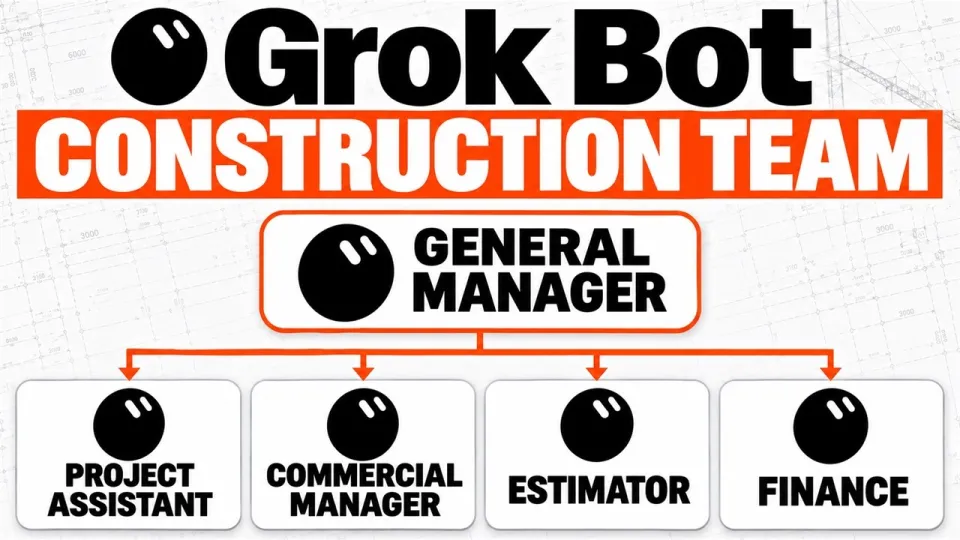
- Add a General Manager bot when the team grows to coordinate work between bots.
- The Contractor OS program offers 100+ pre-built workflows and support for implementing AI in construction.
A Grok Bot for your construction business is a specialised AI assistant configured with a defined role, access to your project data, and rules for what it can read, draft, or change. Tim Fairley, a construction estimator and contract manager with 10 years of experience, recommends setting up six bots, each focused on a core function: business development, pre-construction, project assistance, commercial management, finance, and systems and compliance. You build and test them one at a time, and you keep final approval of prices, contract notices, payment claims, and payments. For a step-by-step roadmap and 100+ pre-built workflows, see the Contractor OS program.
Why a team of six bots beats a single assistant
A single general-purpose bot quickly becomes overloaded and unreliable; splitting work by role keeps each bot focused and makes outputs easier to verify. In construction, the tasks are naturally segmented: finding tenders, preparing submissions, running projects, managing contracts, tracking cash, and maintaining compliance. Each bot can be given a narrow scope, specific data sources, and clear limits on what it may do without human approval. This mirrors how a construction business already divides responsibilities among departments, so adoption is more intuitive for staff.
The six Grok Bot roles and what each does
- Business Development bot – scans tender portals and filters opportunities worth pricing, based on your trade, region, and project size criteria.
- Pre-construction bot – reviews tender documents, helps prepare submissions, and follows up on clarifications or addenda.
- Project Assistant bot – one per project; handles correspondence, updates programmes, and maintains project registers.
- Commercial Manager bot – tracks variations, contract notices, and payment claims, flagging deadlines and required actions.
- Finance bot – monitors cash flow and money owed, providing alerts on upcoming payments and receivables.
- Systems and Compliance bot – checks insurances, licences, and other business paperwork for currency and completeness.
Each bot should have a single clear goal; for example, the Business Development bot's goal is not to win work but to surface tenders that meet your pre-set criteria. That focus makes its output predictable and easy to audit.
How to connect tools and set rules for each bot
Start by connecting the tools each bot needs: email, cloud storage (e.g., project folders), accounting software, and tender portals. Organise project files in a consistent structure so bots can find documents reliably. Then define access rules: what each bot can read, what it can draft (e.g., emails, notices), and what it can change (e.g., status fields in a register). For example, the Commercial Manager bot might read contract documents and draft notices but not send them; the Finance bot might read invoices and flag discrepancies but not approve payments. These guardrails prevent costly errors and keep you in control.
How the bots pass work between them
Workflows often span multiple bots. A tender found by the Business Development bot is handed to the Pre-construction bot for review; once a project starts, the Project Assistant bot takes over correspondence and registers; the Commercial Manager bot monitors variations and notices; the Finance bot tracks payments; and the Systems and Compliance bot ensures insurance and licences remain valid. You can implement handoffs via shared folders, email triggers, or a simple task list that each bot updates. As the team grows, a General Manager bot can coordinate: assigning tasks, checking that handoffs occur, and summarising status for you. Fairley suggests adding this role only when the volume of work justifies it.
Common concerns about AI in construction
Some contractors worry that AI tools are overhyped or that each new tool promises to be the best. The key is to start small: pick one bot, test it on a live but low-risk task, and measure the time saved. Another concern is data security; use access rules and keep sensitive approvals with you. Finally, AI fatigue is real—focus on one role at a time rather than trying to implement all six at once. The goal is practical assistance, not a complete overhaul.
All links from the video
- Contractor OS program – step-by-step roadmap, 100+ pre-built workflows, and support.
- Work with Tim
- Tim Fairley on LinkedIn
- Operum free construction management software
- ZZTake-off software
Start with one bot and scale from there
Implementing a Grok Bot team is a gradual process: choose the role that addresses your biggest pain point, set clear rules, and test it before adding the next. Keep approval of prices, contract notices, payment claims, and payments with you. Over time, the bots can reduce administrative load and help you focus on billable work. For a structured roadmap and pre-built workflows, join the Contractor OS program. This breakdown is based on the video by Tim Fairley, who shares practical AI and construction management advice on his channel.
Questions & answers
Do I need technical skills to set up a Grok Bot for construction?
No, but you need to be organised. The setup involves connecting tools like email and cloud storage and defining rules for each bot. Tim Fairley recommends building one bot at a time and testing it on real tasks, which makes the process manageable without coding.
How do I ensure the bots don't make costly mistakes?
Set clear access rules: decide what each bot can read, draft, or change. Keep approval of prices, contract notices, payment claims, and payments with you. For example, a bot can draft a notice but not send it until you review.
Can I use just one bot instead of six?
Yes, you can start with one bot focused on your biggest pain point, such as tender searching or project correspondence. As you see results, you can add more roles. The six-bot structure is a recommended end state, not a requirement.
How do the bots communicate with each other?
They can pass work through shared folders, email triggers, or a task list that each bot updates. When the workload grows, a General Manager bot can coordinate handoffs and summarise status for you.
Source: How to Set Up Grok Bot for Your Construction Business · Markdown version